Skip to content
MiniDisc CentralSearch

Device

Sony MDS-JE320

Historical source · MiniDisc.org archive

Manufacturer
Unknown
Model / source grouping
MDS-JE320
Device type
Unknown
MDLP modes
Unknown
NetMD interface
Unknown
Hi-MD support
Unknown

Capabilities above are source-stated. USB transfer direction, software requirements and regional variants need separate checks.

Manuals & documentation

Search documentation

Accessories & internal parts

Source-referenced components. Check conditions before substituting parts.

Preserved historical reference

Original source · Original dates and notices remain in the article. Historical advice may no longer apply.

Sony MDS-JE320

left_arrow.gifNewer   Olderright_arrow.gif

All, MDS-DAV1, S500, SE9, JB980, JE480, JE780, NetMD Mockup, NT1, JE770, JE470, PC3, SP55, S50, JA333ES, JB940, JE440, JE640, LSA1, JB730, JA555ES, PC2, JB930, JE630, JE530, JE330/M100/S40/41, DL1, JA33ES, JE320, JE520/S39, PC1, JA30ES, JE510/S38, JB920, W1, JA20ES, JA22ES, JA50ES, JE700, J3000, JE500/S37, 503, JA3ES, 303/S35, 302/S30, 501, 101, S707

PictureNameDescPriceConnectorsDimensions
sony_mdsje320_thumb_110.jpg
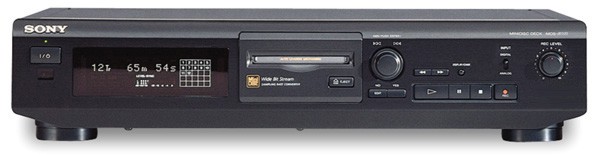
Sony MDS-JE320MD Deck
Intro: 11/1998 (? guess)

Availability:
IN: line, optical. OUT: line
Availability:

Features: Cost reduced version of MDS-JE510. Compared to the JE510, it lacks a headphone jack, mono-recording mode, date and time stamp recording, digital optical output and the wireless remote (though front panel IR port is still present so a remote may be purchased separately). Unit is sold in Sony MD BUNDLE 5. Understood to work with RM-D10P/D20P remote. TOC cloning not possible (machine ejects disc when power applied). Unit suffers same self-turn on problem as the MDS-JE510 (see MDS-JE510 entry for repair details and Sony service bulletin).

Links: PCAVTech's Technical Benchmark page for this unit. MiniDiscussion has collected user reviews for this unit.

Reviews:

    User Manual: MDS-JE320

    Service Manual: MDS-JE320

    Return to the
    MiniDisc Equipment Browser
    MiniDisc Accessories Browser or
    MiniDisc Community Page.