Source: MiniDisc Wiki contributors · September 3, 2026 snapshot · CC BY 4.0, except where otherwise credited.
Attribution and changes
Adapted from “Konica Picture MD Viewer Station”. Links, layout and file names normalized; missing database fields restored; remote embeds replaced with links. Manufacturer manuals and separately credited photographs retain their original attribution.
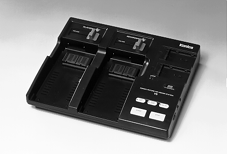
| Name | Picture MD Viewer Station |
|---|---|
| Manufacturer | Konica |
| Released | 1996/01 |
| Device type | misc |
| Recorder | Not recorded |
| MDLP | No |
| NetMD | No |
| Hi-MD | No |
| Radio | No |
| Dimensions | Not recorded |
| Weight | Not recorded |
| ATRAC ver | Not recorded |
| Battery | Not recorded Not recorded |
| Battery notes | Not recorded |
| Sidecar (depr) | Not recorded |
| Voltage | Not recorded |
| Power cable | Not recorded |
| Price (launch) | Not recorded |
| Not recorded | |
| - | |
| Inputs | Not recorded |
| Outputs | Not recorded |
| Control | Not recorded |
In combination with the newly introduced Konica Picture MD Viewer Station ,sound can be input onto the MD Data disc to enjoy both image and audio. Main Features
1. Image Playback
- Standard playback: Images are played in sequence through key operation.
- Index-specified playback: The image specified on the index screen can be played.
- Index playback: The index screen are played in sequence through key operation.
2. Image processing
- Cropping: Zooming and scrolling are enabled through simple key operation.
- Rotation: The displayed image can be rotated 90 degrees clockwise.
- Reversing: The displayed image can be reversed right to left.
3. Auto playback
- Album playback: Images on the specified album are played in sequence.
4. Audio playback
- Narration playback: The narration recorded for the specified images played along with the imag
- BGM playback: BGM recorded for each album is played along with the album.
- Either narration or BGM playback can be selected for auto playback.
5. Creating an order file: Printing condition for the recorded images can be recorded on the disc. Under the recorded conditions, images can be printed automatically from the Konica Picture MD Editor.
- Recording: Cropping (framing) information, print size and number of prints can be recorded.
- Erasing: The records on orders can be erased.
- Editing: The print size and number of prints can be changed.
6. Music playback: Audio MD can be played back on this MD Viewer.
Content adapted from: Konica press release Konica press release (MiniDisc Wiki mirror)
Manuals
Repair
Photos
Have photos or data to add? Edit the page! We do not accept contributions via email.
Additional specifications and references
| Web Md | No |
|---|---|
| Manual | |
| Region | Japan |