Source: MiniDisc Wiki contributors · September 3, 2026 snapshot · CC BY 4.0, except where otherwise credited.
Attribution and changes
Adapted from “Common terms”. Links, layout and file names normalized; missing database fields restored; remote embeds replaced with links. Manufacturer manuals and separately credited photographs retain their original attribution.
There are a lot of terms, initialisms, and acronyms you may come across when researching MiniDisc. This section hopes to cover the most common ones.
ATRAC
ATRAC is the audio compression format Sony developed to use with MiniDisc. This audio compression is how a MD can hold the same amount of audio as a CD on a much smaller disc.
Because Sony could develop dedicated chips to encode and decode ATRAC audio, it performs very well when compared to other audio compression formats of the time.
Later MiniDisc equipment improved the quality of ATRAC encoding and decoding significantly. You can expect better audio recording from a later device than an early one. This applies even when a disc recorded on a newer device is played back on an older one.
MDLP
MDLP (MiniDisc Long Play) is an addition to the MiniDisc format introduced in 2000. It allowed for 160 or 320 minutes of audio to be recorded to a standard 80 minute MD.
Sony achieved this by both using a newer compression format, ATRAC3 (not to be confused with version 3 of the original ATRAC format) and by compressing the audio further, causing reduced audio quality (especially on LP4 mode.)
SP, LP2, and LP4 tracks can be combined on any disc. Audio recorded in LP mode can not be played back on non-MDLP equipment - only silence will play. There is no such thing as a "MDLP disc" or disc "formatted" in MDLP mode like there is with Hi-MD.
All commercially released MiniDiscs (both during its commercial life and now) are recorded in SP mode and are compatible with all MD equipment.
NetMD
NetMD is the branding Sony used for MiniDisc equipment that can connect to a PC and copy audio (usually with SonicStage or Simple Burner software.) Nowadays NetMD equipment is highly recommended due to the ease of copying music with new apps (Web MiniDisc Pro), long battery life, and high sound quality.
All NetMD equipment supports MDLP, but not all MDLP equipment supports NetMD.
Hi-MD
At the end of MiniDisc's commercial life, Sony expanded the format with Hi-MD, a new standard with new recorders and discs. Even on standard MD discs, Hi-MD allowed new modes such as uncompressed audio.
Hi-MD devices are compatible with standard MiniDiscs (SP and MDLP) but Hi-MD discs and standard discs in Hi-MD format will not work on SP or MDLP device.
Today, Hi-MD devices and discs are much more expensive than standard MD equipment, and are not a recommended buy for a beginner.
ToC
"Table of Contents" - a sector of the disc that contains track names, length, and location. The ToC allows for tracks to be moved, renamed, or deleted without rewriting the whole disc and is key to many of MD's powerful editing features.
SonicStage
SonicStage was the software Sony provided for copying music to NetMD recorders when they were on the market. It was bad. Luckily newer software means there is little reason to need SonicStage anymore, although we provide instructions if you do.
WMD
WMD or WMDpro refers to the Web MiniDisc (Pro) application, the most popular way to copy music to a MiniDisc as of 2024. It is a Chrome or Electron web app that can copy (almost) any audio file onto a Sony MiniDisc using the NetMD USB protocol. It can also manage tracks, erase discs, and enable new features that extend the MD format. It is a complete replacement for Sony's SonicStage and Simple Burner software. It is considered the flagship NetMD software project.
SCMS
Because of (silly) fears from recording labels about digital copies from MiniDisc, the "Serial Copying Management System" was added to nearly all consumer MD equipment. SCMS "tags" a track if it is recorded from a digital source. Another recorder that respects SCMS tags will then refuse to record from that track. This does not affect analog recording.
For example, if you copy a CD to MD via a digital Toslink cable, then try to copy that MD to another MD via a digital Toslink cable (a 2nd generation copy), the recorder will block it. You would instead have to copy from the CD to each MD (a 1st generation copy.)
Gumstick
A "gumstick" battery is the most common battery used in MiniDisc portables, aside from common AA or AAA cells. Modern batteries are still manufactured and easy to find online.
Inline remote
An inline remote allows the player to be kept in a bag or backpack while extending the 3.5mm headphone jack. It connects to a portable player and provides buttons (and often a display) for controlling playback. Some players do not have all of their controls on the device itself as a remote was expected.
Device types
MiniDisc equipment can be categorized into seven different types, as recognized in how the wiki divides equipment pages:
Automotive
These are head units or accessories for cars and other vehicles. Over 800 different models were produced.
Most were included with JDM vehicles or aftermarkets that use the single or double-DIN form factor. Most automotive units cannot record to MiniDiscs, only play them.
Bookshelf
Very popular in the 90s and 00s, these are all-in-one units that can be used standalone with just speakers. MiniDisc's small size made it a natural inclusion in these systems, which are almost always smaller than a full hi-fi stack.
Boomboxes
Although not as iconic as cassette boomboxes of the 1980s, the small size, skip protection, and low power consumption of MD made it an obvious inclusion on boomboxes.
However, most (but not all) MD boomboxes were only released in Japan. You need to be aware of the shipping restrictions some sellers or proxy services have on speakers, as well as AC voltage and FM radio bands covered below. Some boomboxes support C or D cell batteries, but these quickly become expensive to run.
Decks
Mostly forgotten as of 2024, a deck is a piece of audio equipment to be used as part of a "hi-fi stack" - a collection of audio components connected together via an amplifier and external speakers. A stack may include a record player, tape recorder, CD player, radio tuner, and equalizer from different brands. A deck does not have its own amplifier for speakers, compared to a bookshelf unit.
Portables
MiniDisc was most popular as a portable format. Portables are devices that use batteries and can be taken on the go. They are divided into recorders and players. Read more in the what to get section or the extended buyer's guide.
Professional
Radio stations, journalists, recording studios, and many others used MD in their workflows. Equipment designed for use here such as rackmount or field recorders are listed seperately.
Miscellaneous
Used for anything outside of these categories, this includes eBook readers, PCs with MD drives, and cameras.
SPDIF
The "Sony Philips Digital InterFace" is a standardized way to send uncompressed stereo audio or compressed surround sound such as Dolby Digital or DTS between devices. It was commonly used in the 90s and 00s for connecting CD, DVD, and video game equipment to an amplifier.
Because a digital audio signal does not need to be converted to analog and then back to digital inside the MD recorder, SPDIF is the preferred way to record in real time ("dubbing") compared to RCA or 3.5mm headphone inputs. MD recorders do not support a Dolby or DTS signal at all.
An SPDIF signal can be sent over two formats: TOSlink or coaxial.
TOSLink
The TOSLink connector (named for Toshiba, the company that created it) is an optical connector used to send SPDIF audio over a fiber optic cable. TOSlink connectors are recognizable by their square shape with notches and a red light emitting from the device or cable. Most SPDIF ports also have a plastic flap covering the optical LED.
The Playstation 2 features a SPDIF port and is a popular choice for copying CDs to MD. The Xbox 360 and PS3 also feature TOSlink ports, although the original 360 requires a supported AV cable to include the port.
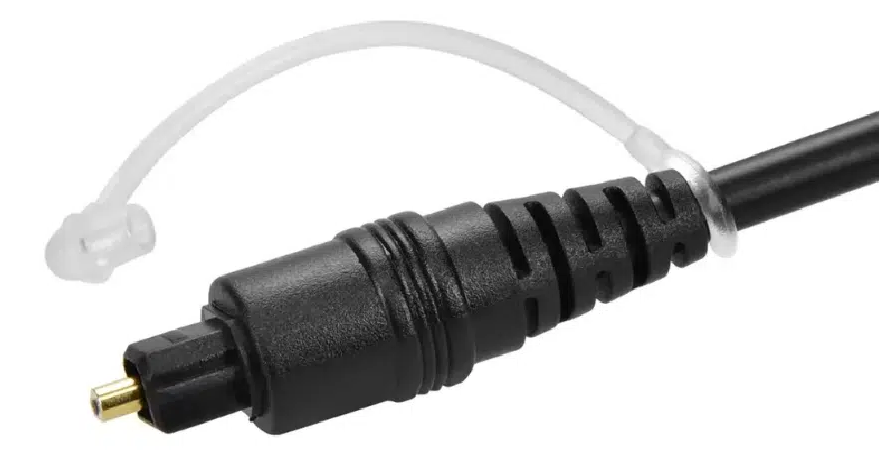
Mini TOSLink
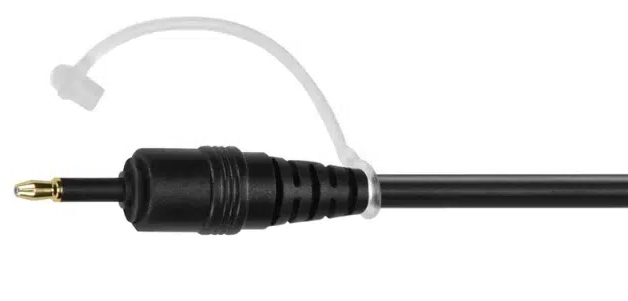
Mini-TOSlink is a miniturized version of TOSlink, which can be included as part of standard 3.5mm ports. The optical LED is deeper than a standard 3.5mm analog jack so Mini-TOSlink jacks are longer and do not have the standard TRS (tip-ring-sleeve) markings that analog connectors do. The plug is otherwise idenitcal, minus a potential red glow inside.
Adapters to convert mini-TOSlink to full-sized are readily available and do not require any additional chips.
Mini-TOSlink was included in some laptop models, such as the final model PowerBook G4 ("DLSD") and early Intel MacBooks ("unibody").
Digital coaxial
In addition to TOSlink, SPDIF signals could also be sent over standard (copper) cables. By far the most common was digital coaxial ("coax") which uses a single RCA jack and is compatible with the same cables as analog stereo (white and red) audio. There was not an equivalent miniturized version of coax as there was TOSlink, so mini-TOSlink is much more common on portables.
TOSlink and coax existed side by side throughout the interface's life, with MD equipment often supporting one or the other. Sometimes the digital connections on a deck varied by region or between otherwise very similar hardware. Nowadays converters are affordable and readily available, so do not let a particular digital audio format impact your buying choices.
Dedicated coax digital cables are usually colored orange to separate them from video or analog audio cables, although they are functionally identical.