Source: MiniDisc Wiki contributors · September 3, 2026 snapshot · CC BY 4.0, except where otherwise credited.
Attribution and changes
Adapted from “Overflow menu”. Links, layout and file names normalized; missing database fields restored; remote embeds replaced with links. Manufacturer manuals and separately credited photographs retain their original attribution.
In the top-right of the app is the overflow (ellipsis) menu. This shows many more features and settings.
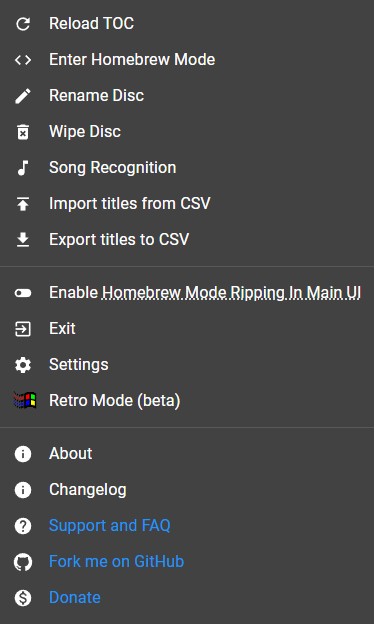
- Reload TOC - refresh the list of tracks from the Table of Contents on the disc
- Enter Homebrew Mode - advanced features and options (more below)
- Rename Disc - change the disc title
- Wipe Disc - erase the disc (even if it has "checked-out" audio from SonicStage)
- Song Recognition - identify tracks using Shazam (requires a userscript or ElectronWMD, more below)
- Import titles from CSV - use a CSV file to title tracks
- Export titles to CSV - create a CSV list of titles to import
- Homebrew mode ripping in main UI - download audio files from portables (see Managing tracks)
- Exit - disconnect from Web MiniDisc Pro
- Settings - options and configurables, including the remote encoder and full-width titles
- Retro mode - a Windows 95 interface (does not support all features)
- About - information about the app
- Changelog - recent changes, shows on first visit
- Support and FAQ - the Wiki's guides section
- GitHub - asivery's GitHub
- Donate - asivery's Ko-Fi page