Source: MiniDisc Wiki contributors · September 3, 2026 snapshot · CC BY 4.0, except where otherwise credited.
Attribution and changes
Adapted from “Song Recognition”. Links, layout and file names normalized; missing database fields restored; remote embeds replaced with links. Manufacturer manuals and separately credited photographs retain their original attribution.
As of version 1.3.0, Web MiniDisc Pro has Shazam integration to identify and title tracks using audio fingerprints.
Song recognition works better with ElectronWMD than the web browser-based Web MiniDisc Pro. See the next section for how to enable Song Recognition in a browser.
See the Recording or downloading tracks section for detail about line-in versus exploits mode.
Select "Song Recognition" from the overflow menu.
Browser installation
As stated above, this section is not required with ElectronWMD.
After clicking "Song Recognition" from the menu, a dialog box will popup.
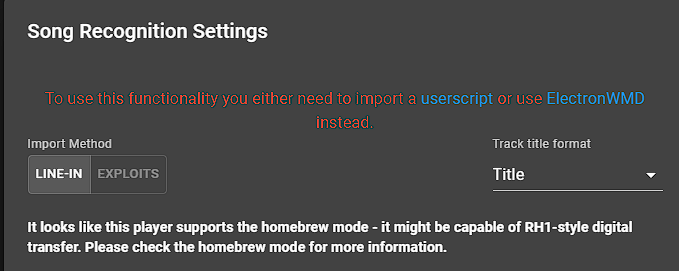
Installing the userscript
Clicking "userscript" from the dialog box will not work without the Tampermonkey browser extension, available in the Chrome and Edge add-on stores.
The built-in Chrome userscript engine will not work.
With Tampermonkey installed, click the "userscript" link. A new window will open with detail about the script. Click "install".
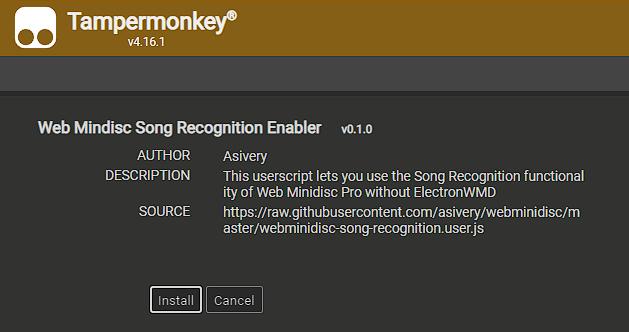
Refresh the page and reconnect the MD recorder.
Recognizing tracks
Select the tracks to be recognized by Shazam. Choose the title format with the drop-down box in the top right.
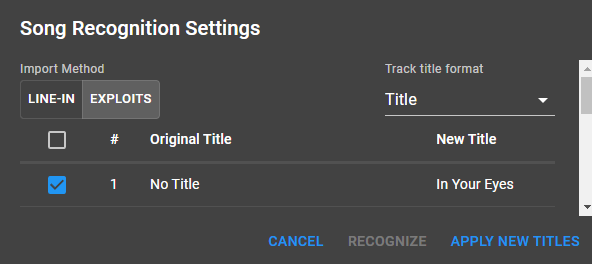
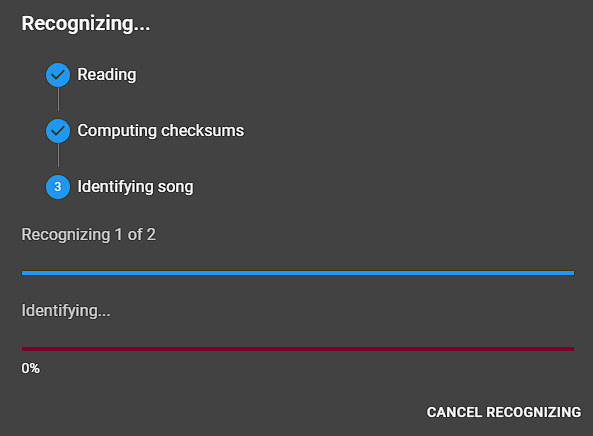
Click "recognize" in the bottom right. Web MiniDisc Pro will fetch new track information from Shazam using a snippet of the audio (either from line-in or from homebrew download mode):
Confirm the matches by checking the box to the left, then click "Apply new titles" to write the new title to the MiniDisc.